Artificial Intelligence
AI Model: Understanding Safetensors and GGUF Formats
Safetensors vs GGUF: which AI model format to choose? Complete guide to understand these formats and use AI locally on your computer.

When exploring artificial intelligence model sharing platforms like Hugging Face, one question consistently arises: why does the same model exist in multiple versions, bearing strange names like Safetensors or often GGUF?
This apparent complexity actually hides a simple and pragmatic logic. Understanding these formats will enable you to have a personalized use of AI models, adapted to your hardware and needs. Whether you have a super-powerful workstation or a standard laptop, there’s a format designed for you.
Why Multiple Safetensors and GGUF Formats for the Same Model?
The multiplication of AI model formats responds to a fundamental constraint: the extraordinary diversity of computer hardware used by developers and technology enthusiasts. A large language model (LLM) can weigh several tens of gigabytes in its full version. However, not everyone has a professional graphics card with at least 24 GB of dedicated video memory.
This technical reality has led the community to develop different formats, each optimized for a specific use. Some prioritize raw performance and absolute fidelity to the original model, while others focus on intelligent compression to make these technologies accessible to the greatest number of users.
Safetensors: The Uncompressed Reference Format
The Safetensors format has gradually established itself as the de facto standard for distributing artificial intelligence models. Its name directly evokes its philosophy: security first. Unlike older formats like Python’s pickle, Safetensors was designed to eliminate the risks of executing malicious code when loading a model.
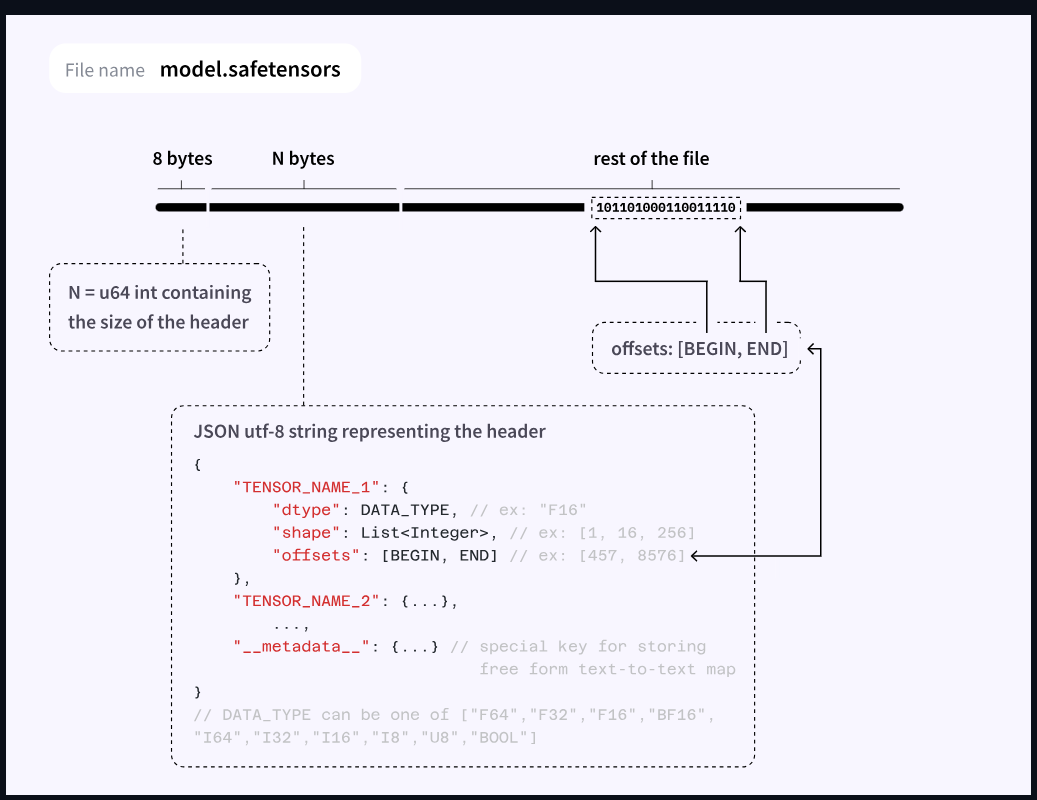
Technically, Safetensors stores the neural network weights in their original precision, typically in float16 or float32 format. This absence of compression ensures that the model functions exactly as its creators trained it, without any loss of quality or performance modification. For users seeking the most faithful results possible, Safetensors represents the obvious choice.
However, this fidelity comes at a price. Safetensors format models require substantial memory, primarily on the graphics card. A 7-billion-parameter model will occupy approximately 14 GB of VRAM. This hardware requirement de facto reserves Safetensors for users equipped with high-performance graphics cards, typically NVIDIA GPUs in the professional or high-end gaming range. For those who have this type of equipment, Safetensors offers an optimal experience with fast generation times and maximum quality.
GGUF: The Revolution of Accessible Quantization
Faced with hardware limitations that excluded a large portion of the public, the GGUF format appears as a true democratic innovation. Developed in the llama.cpp ecosystem, GGUF relies on an ingenious principle: quantization. This technique consists of reducing the numerical precision of model weights, for example going from 16-bit floating-point numbers to 4 or 8-bit integers.
The genius of GGUF lies in its pragmatic approach to this compression. Rather than offering a single quantization level, the format offers an entire spectrum of choices, designated by codes like Q4_K_M or Q8_0. Each level represents a different compromise between file size and quality preservation. A model quantized to Q4 will weigh approximately four times less than its Safetensors version, while generally retaining more than 95% of its original capabilities.
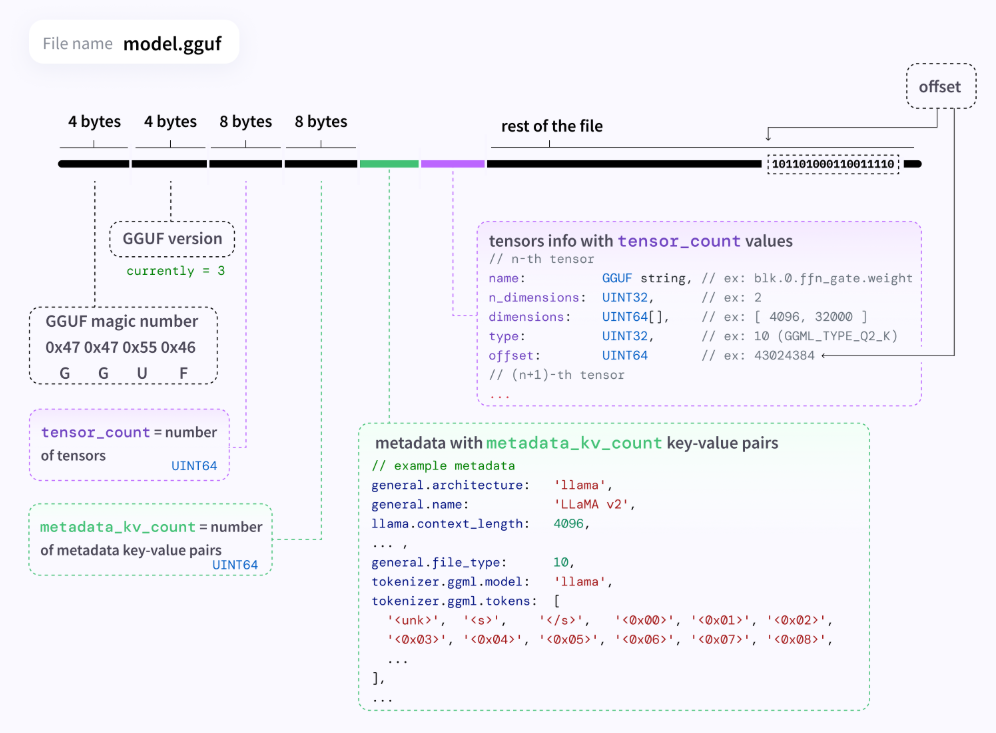
The other revolution brought by GGUF concerns memory usage. Unlike Safetensors which heavily taxes the graphics card, GGUF can operate primarily on your computer’s standard RAM. This flexibility radically transforms the hardware equation. A standard laptop with 16 GB of RAM can now run models that previously required a professional workstation. For users with modest configurations, GGUF opens access to artificial intelligence models that were previously inaccessible to them.
How to Choose Between Safetensors and GGUF in Practice?
The choice between Safetensors and GGUF essentially depends on your hardware configuration and priorities. If you have a powerful graphics card with at least 12 GB of VRAM and you’re looking for the best possible performance, Safetensors naturally imposes itself. On the other hand, if your hardware is more limited or if you want to experiment with multiple models simultaneously, GGUF represents the pragmatic choice.
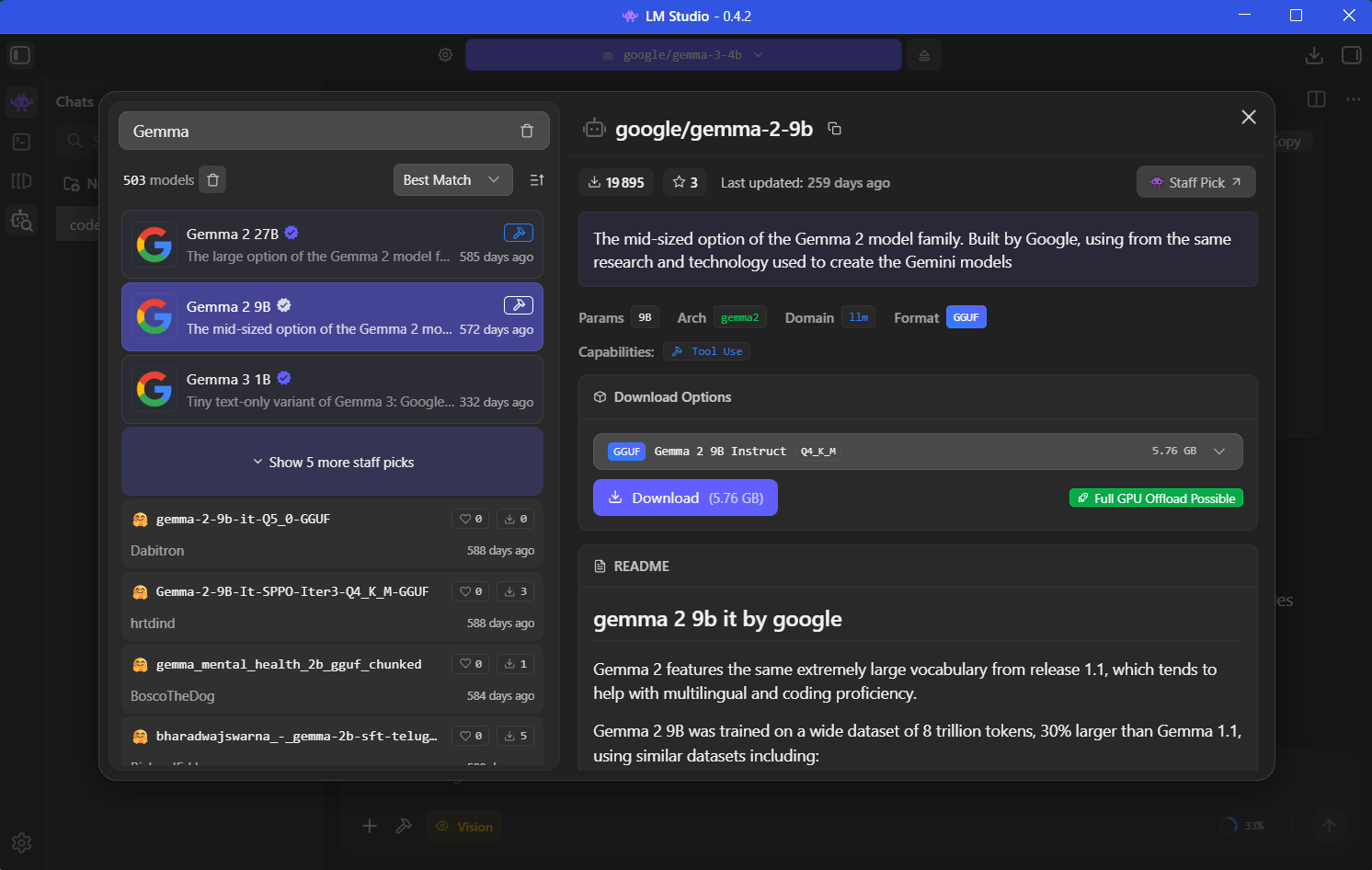
To use these formats, several tools have established themselves in the ecosystem. LM Studio is probably the most accessible solution for beginners. This intuitive graphical application allows you to download, manage, and use GGUF format models without touching a single line of code. The clear interface guides users in choosing the appropriate quantization level for their configuration.
For those who prioritize speed and efficiency on the command line, Ollama has built a solid reputation. This tool simplifies downloading and running GGUF models with minimalist syntax. Finally, llama.cpp represents the reference engine for advanced users who want total control over execution parameters. These three solutions form a complementary ecosystem covering all levels of expertise.
AI Model Formats
The coexistence of Safetensors and GGUF formats illustrates a fundamental trend in the development of artificial intelligence. As models continue to gain in sophistication and size, the intelligent quantization represented by GGUF becomes increasingly strategic.
This technical evolution is part of a broader movement to democratize AI. By allowing more users to experiment locally with advanced models, these formats contribute to knowledge dissemination and the emergence of a more diverse community of creators and innovators.